Caseboard
The Caseboard is the case's home page, and every case opens on it. It shows what needs you, where the case stands, what happened recently, the case's key facts, and its court calendar.
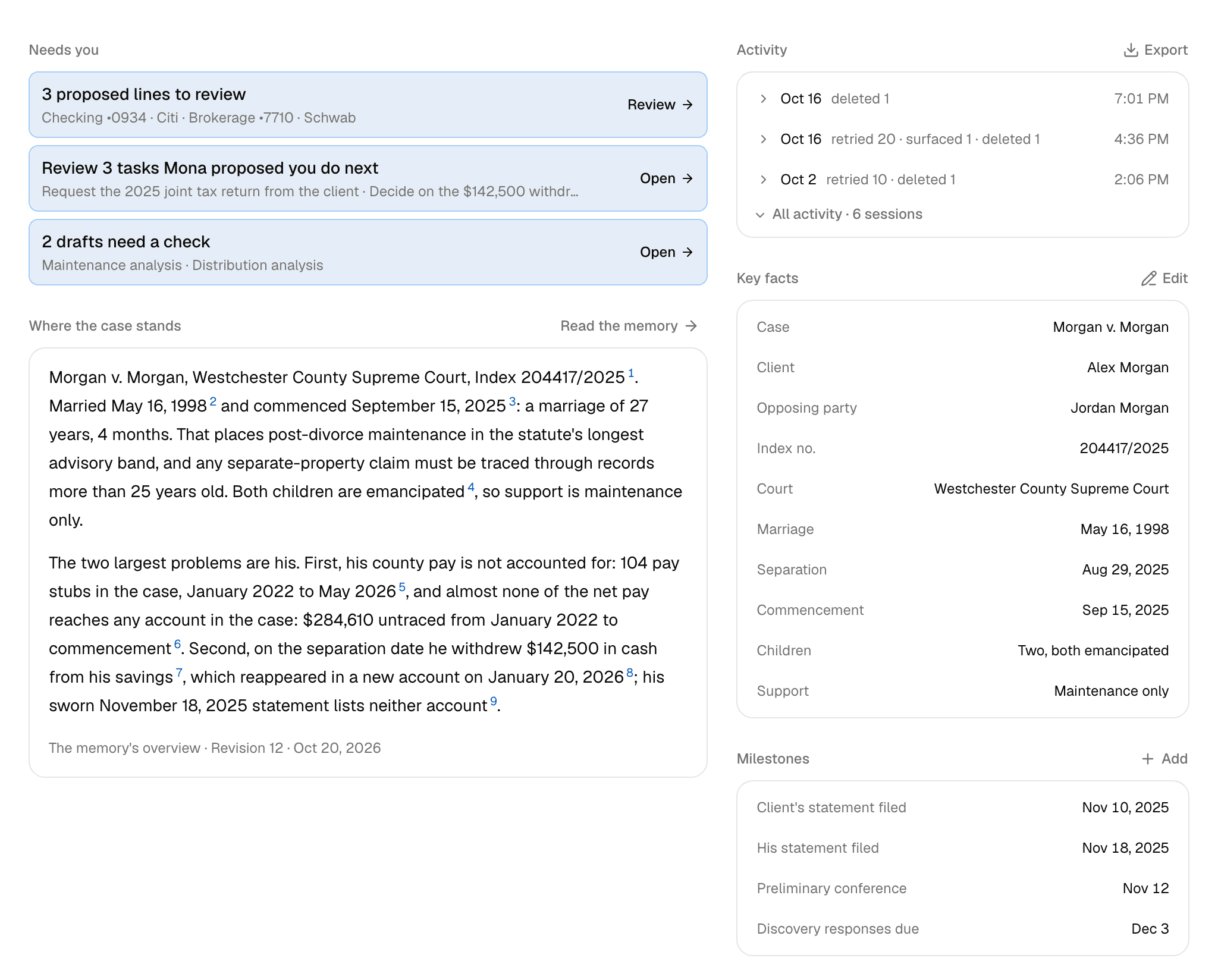
Needs you
Each row is one kind of work waiting on you. It gives the count and names the first one or two items. Click a row to open the page where you resolve it.
| Row | What's waiting | Opens |
|---|---|---|
| N proposed lines to review | Lines the Statement agent proposed that you haven't added or declined | Net worth analysis |
| Review N tasks Mona proposed you do next | Your tasks in the case memory | Memory |
| N drafts need a check | Work product with an authority to check or a source that changed | Work product |
| N sources need your review | Case context waiting for you to confirm it, or edited since you did | Case context |
| N insights to triage | The items in Needs review on Documents | Documents |
| The memory is N changes behind | New material since the memory's latest revision | Memory |
A row leaves once its cause is resolved, so there's nothing to dismiss. When more than five rows are waiting, the rest fold behind N more.
Where the case stands
This is the Overview from the latest case memory, word for word, so it changes when the memory does. A line beneath it gives the revision and its date.
Click a footnote to open its source, or Read the memory to open the whole memo. Until Mona has written the memory, click Ask Mona to write it.
Activity
Activity is the case's log of what you, your colleagues, and Mona did. The lines come straight from the log, and no AI writes them.
The log is grouped into sessions. A gap of more than 30 minutes starts a new one, and a session can mix people and Mona.
- A session still in progress shows Live.
- An earlier session shows its date, a summary such as "uploaded 14 · classified 14", and its start time. Click it to see its events.
- The newest three sessions show first. All activity opens the rest.
To keep a record, click Export, then Download CSV. You get every event on the case, oldest first, with its time, who did it, the kind of event, and a description.
Key facts
Key facts lists what's been entered: the case name, client, opposing party, index number, jurisdiction, the marriage, separation, and commencement dates, and the number of documents. A detail not yet entered is left out.
Editing the case's details
Click Edit. You can change the jurisdiction and county, the three dates, the case name and number, and the spelling of either party's name. The case name and both party names are required.
Click Review changes to see each new value beside the old one, then Confirm and save.
Three changes reach further:
- A party's name: Mona re-matches the case's documents to the corrected name. Party assignments you made yourself, or made while reviewing a Statement of Net Worth, stay as they are. Who is the client and who is the petitioner are set when you create the case and can't be changed here.
- Jurisdiction or county: later analysis may differ from earlier results.
- Commencement date: this is the date the divorce action began, not a statement's filing or signing date. Results Mona has already recorded stay as written, so ask Mona to recheck anything that relied on the old date.
A footnote that cites one of these details opens this same editor.
Milestones
Milestones is your court calendar: filings, hearings, deadlines, mediation, and trial dates. You keep it, and Mona doesn't read it. If a date should shape Mona's advice, tell Mona, and it will keep the date in the memory's Procedural posture.
Click Add and enter the date, kind, title, and an optional note. Click a milestone to edit it, mark it Done, or delete it.
Milestones list oldest first. A done milestone is struck through. One whose date has passed without being marked done shows Overdue in red.
The case's marriage, separation, and commencement dates belong in Key facts.