Memory
The case memory is Mona's memo of the case: what it understands, what the evidence supports, and what should happen next. Each case has one, and it carries Mona's understanding from one chat to the next.
What Mona concludes in a chat counts only once it's written here, so ask Mona to record anything you want it to keep.
Getting the first memory
Until Mona writes one, the page offers one question: Where does the case stand? Click it to open a chat with the question typed in, then send it. Mona writes from what the case holds so far and marks what's absent as Missing.
What's in it
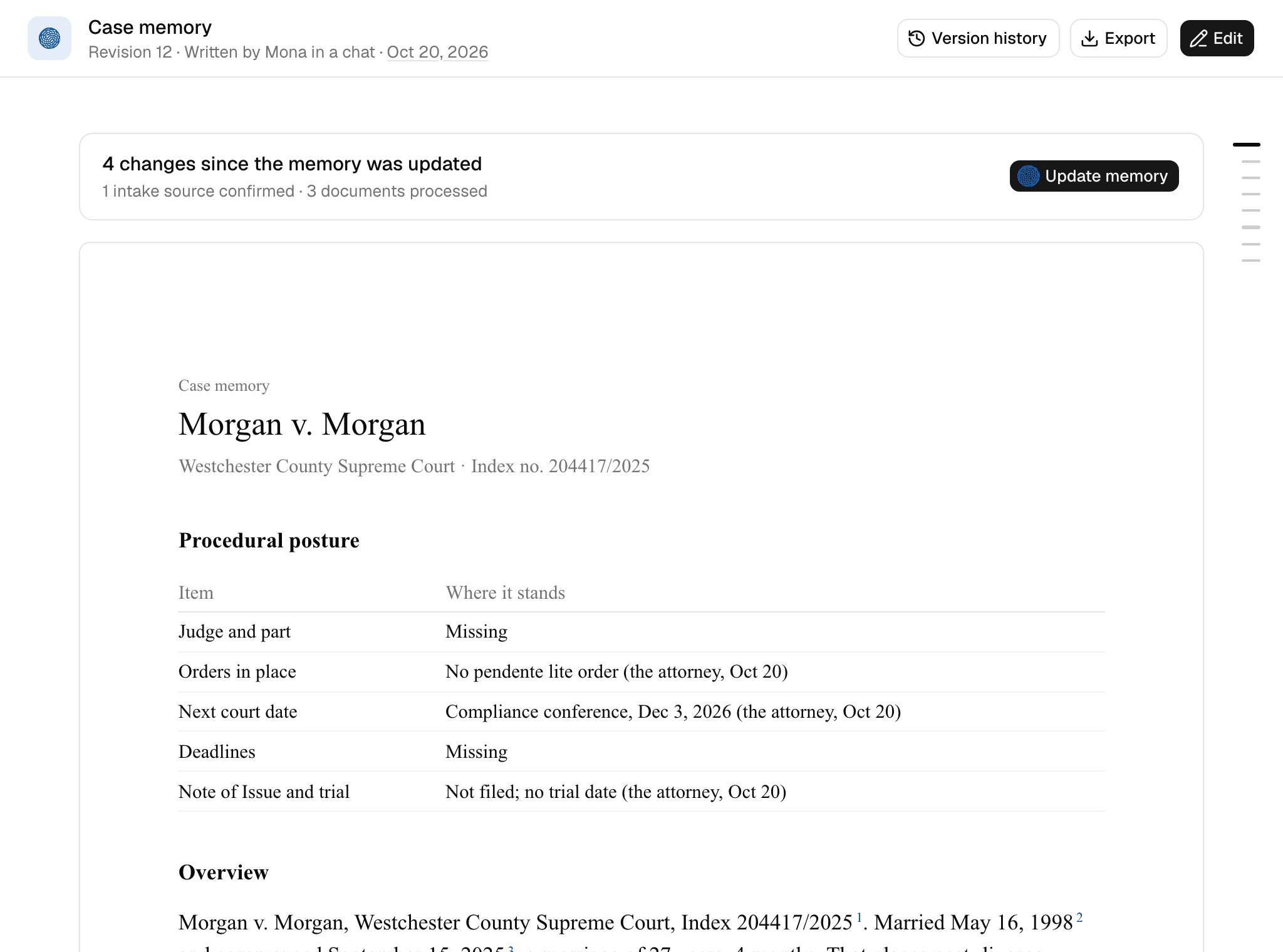
- Procedural posture: where the case stands in court: the judge and part, orders in place, the next court date, deadlines, the Note of Issue, and the trial date.
- Overview: where the case stands, in a few sentences. The Caseboard shows this section.
- Case summary: tables for the parties, the timeline, documents, accounts, the Statements of Net Worth, and the headline figures.
- Findings: documented facts that change how to approach the case, one per issue, ordered by impact. When two sources disagree on a fact that moves a number, the Finding gives both readings and what each would change, and a task for you names the document that would settle it. Mona doesn't choose a reading.
- Objective: your client's goals and constraints, in your words, with the progress on each. Mona ranks its work against the Objective, so the same finding can matter more in one case than another.
- Decisions: your standing rulings. See Tasks and Decisions.
- Tasks: the open questions, split by who acts next. See Tasks and Decisions.
Mona records each figure as the case already holds it, using the labels in Evidence and citations. Writing the memo doesn't verify anything: a line nobody has checked stays declared, and checking it becomes a task for Mona, ranked by dollars.
The memo reports your client's weak points the same way as the other side's. It doesn't predict outcomes. Modeled figures belong in the support and ED analyses.
Reading it
The header says which revision you're reading, who wrote it and why, and when. The outline in the margin jumps between sections.
Click a footnote number to open its source. The Sources start on their own page at the end, numbered the same way. A source that changed after Mona cited it says changed since this was written.
Each page's footer gives your firm's name, marks the memo privileged attorney work product, and numbers the page.
Tasks and Decisions
These two sections are how you steer Mona.
Tasks
Tasks are the open questions in the case, each naming what it could change. They are split by who acts next:
- Attorney: what only you can do: a document to request and from whom, a question for your client, or a decision that's yours, each with what it unlocks.
- Mona: the moves Mona can make now with what's in the case, each with what it settles and its cost.
A question waiting on a document or an answer is listed once, under you. Mona ranks each list by how much the answer could change and how likely the next step is to settle it. Correcting a figure it knows is wrong comes first.
- Pick a task: ask Mona, "What should we do next?" It offers one to three of its tasks, recommends one, and asks which to take. You can also name any task in a chat. Tasks are proposals, so none starts until you pick it.
- Park a task: tell Mona to park it. Mona won't reopen it unless you ask.
- Close a task: a task closes with a cited answer. On a material question, Mona proposes closing it and you decide. A request you've sent isn't an answer, so the task stays open until the evidence arrives or you rule.
Decisions
Decisions are your standing rulings. Mona applies them from then on and doesn't reopen them.
- Record a Decision: tell Mona your ruling in a chat and ask it to record it. When you give a reason that should bind later work, Mona proposes recording it.
- Replace a Decision: tell Mona what replaces it. The old one stays, struck through, with what replaced it and why. If evidence or a work product contradicts a Decision, Mona proposes new wording as a task for you.
- Remove a Decision: edit the memo yourself. Mona can't drop one.
Keeping it current
The memory updates only when someone asks. Mona also records the answer when it finishes a task you picked, and it updates the memory in a chat once the subagents it sent from that chat finish.
When new material arrives, a dot appears beside Memory in the sidebar, a row appears in Needs you, and a banner above the memo counts the changes: intake sources confirmed, documents processed, Statement lines changed, and Trace runs finished. Your own edits, uploads still processing, and insights don't count.
Click Update memory to open a chat with the request typed in, then send it. While Mona works, the banner links to the chat.
To change something specific, ask Mona in any chat. Each time Mona revises the memory, it also adds a task to revise any work product the change left behind.
Editing it yourself
Click Edit to change the latest revision. The memo opens as Markdown. Keep the # section headings in order, and cite with [^n] using the numbers in the Sources below the editor.
Fill in What changed, then click Save to add a new revision. If an edit breaks the format, Not saved lists the reasons. You can state a figure without a footnote or remove a Decision, which Mona can't.
Your edit starts no other work, so ask Mona if work product should follow it.
Version history
Click Version history, or the date in the header. It lists every revision by month, with who wrote it, when, the lines it added and removed, and its line on what changed.
Click a revision to read it. Show changes marks what it added and removed from the one before. Close history returns to the latest. Earlier revisions stay as written, and only the latest can be edited.
Printing or downloading
Click Export, then Print or Download PDF. Both keep the footnotes and Sources. The memo is for you and your firm, not for your client or the other side.