Work product
Work product holds the documents Mona writes for you: analyses that stay in the firm, and papers you send out. Mona drafts them, with every figure cited to its source. You edit, sign, and send them yourself.
Kinds
Every kind follows New York practice. Mona writes from what the case holds. When something is missing, it says so and names the document that would settle it, so you don't need all of the material below before you ask.
Mona applies your Decisions in the case memory to every kind.
Analyses
An analysis stays in the firm. A Decision overrides any default it takes. It states your client's weak points as plainly as the other side's, and ends with its open items: each missing document with the dollars it would move, and each call that is yours. It doesn't predict what a court will do.
Support analysis answers what each party pays the other, for how long, and starting when: now under a pendente lite order, at final judgment, and at each later change.
- Needs: both parties' income from their statements and W-2s, the family details on each filed statement, the marriage and commencement dates, each party's age, health, and health coverage, the mandatory add-ons, and what the payor pays now.
- Leaves out: lifestyle analysis, tax effects, college and educational add-ons, the amount of either party's own Social Security benefit, and deciding deviation or above-cap treatment.
ED analysis answers, of the marital estate the evidence supports, how much each party is entitled to, what each keeps, and what payment equalizes the difference.
- Needs: every asset and liability line on both statements, assets the statements leave out, the separate property proofs, payments after commencement on marital debts, and any written agreement. A separate property claim with no proof yet takes the marital default, with the claimed amount priced as the alternative.
- Leaves out: valuing a business or practice, a pension's present value, an unequal split, and deciding contested active versus passive appreciation.
Separate property proof proves one claim that property is separate, as completely as the documents allow, and shows exactly where it is weak. It takes no side, and Trace writes it while checking the line the claim rests on.
- Needs: who claims what and on what basis; the origin documents, such as the statement at the date of marriage, the estate's distribution letter, or the gift letter; statements for every account that held the money; the closing statement or deed for a purchase; and any written agreement.
- Leaves out: valuing a business, jewelry, or art, deciding intent, and ruling on a pass-through.
Papers that leave the firm
These kinds can cite only documents, the transactions, the filed statements, and the case's details. A fact that rests only on what your client said, or on your own notes, stays out.
Discovery demand (CPLR 3120) asks the other party for exactly the records the case is missing.
- Needs: the open questions in the memory, the other work product, and the statements; the other side's letters and productions; the transactions, which show accounts with no statements in the case; and the court, county, index number, and parties for the caption. It also lists the automatic-disclosure items of 22 NYCRR 202.16 the case doesn't hold.
- Leaves out: interrogatories and subpoenas, which are kinds of their own; notices to admit and notices of deposition; service; and the response deadline.
Interrogatories (CPLR 3130) ask the other party for sworn answers to what the records can't show: where money went, who received it, and what an account or asset is.
- Needs: open questions in the memory that only the other party can answer, the discovery demand so no question repeats a request, and the caption details.
- Leaves out: depositions, notices to admit, and service.
Subpoena asks a nonparty for a record no party can produce, such as an employer's payroll, a pension system's file, or a bank's statements, with the notice of reasons.
- Needs: open questions in the memory whose record a nonparty holds, the discovery demand, and the caption details.
- Leaves out: service, witness fees, and a motion to compel or to quash.
Creating one
Click New work product. The gallery shows every kind as a small first page. Pick one and click Ask Mona to draft. A chat opens with the request typed in, so you can add instructions before you send it. A separate property proof asks which asset first.
You can also ask for one in any chat. What Mona writes in a chat is listed in a panel beside it. Mona or Trace writes the first draft of every work product, and you edit from there.
Finding one
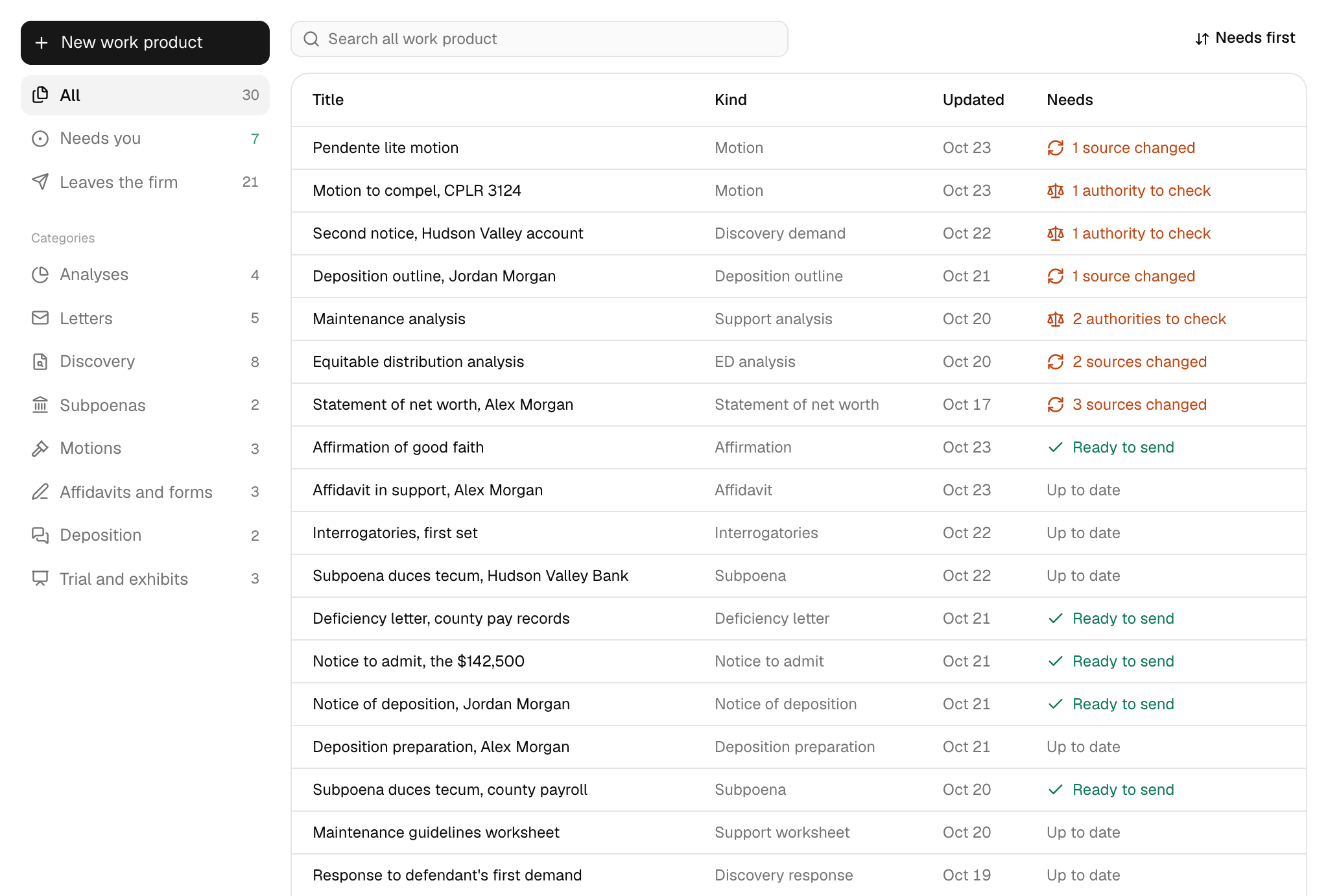
The left side of the page filters by All, Needs you, Leaves the firm, and each category that holds a draft. Search by title or kind, and sort by Needs first, Recently updated, or Title.
The Needs column says what each draft is waiting on: authorities to check, sources changed, Ready to send for a paper with nothing left to clear, or Up to date for an analysis.
Reading one
The brief
Every work product Mona writes has a brief: its answer in two or three sentences, with its figures. An analysis opens with it, as Brief answer. A paper that leaves the firm shows it above the paper, marked Not exported.
Mona keeps the same brief until a revision replaces it. Written at revision N tells you it comes from an earlier revision, so check that it still matches the body.
Comments
A comment is Mona's note to you on a passage: why it's there, and the Finding or task it serves. Hover over, focus, or tap the comment mark at the end of the passage to read it. Comments keep Mona's reasoning in the firm, so no printed or exported copy carries them.
Sources and authorities
Click a footnote number to open its source. See Evidence and citations. An analysis closes with its Authorities, cases and then statutes and rules, and its Sources.
Revising
Ask Mona in a chat, such as "Narrow item 3 to March through June." Mona changes those passages and records what it changed.
Or click Edit to change the title, the brief, and the text in Markdown. Fill in What changed, then click Save. If you leave with unsaved edits, Mona asks first.
Every save adds a revision, and every revision is kept with its line on what changed. Version history works the same way as on Memory.
When Mona changes the case memory or a work product, it tells you which other work product the change left behind and adds a task to revise each one. Your own edits start no other work, so ask Mona if others should follow.
Checking
The Checks button shows how many items are waiting, and a notice above the paper repeats them until they're cleared.
- Authorities to check: a legal authority Mona didn't take from its legal reference, and no one has confirmed. Check it yourself, then click Confirm, or click Take out to remove it. Either one saves a revision. Export waits until each is cleared, for analyses and papers alike.
- Sources that changed: something Mona cited was replaced or is no longer available, so the draft may no longer match the record. This doesn't block export. Click Ask Mona to revise to bring the draft up to date. The source also says changed since this was written in the Sources.
With nothing left, the panel says the draft is ready to send or ready to export.
Exporting
Click Export. What you get depends on where the paper is going.
| Analysis | Paper that leaves the firm | |
|---|---|---|
| Options | Print, Download PDF | Download PDF |
| Title block | Title, kind, date, revision, and who wrote it | Left out, so it opens with its own caption |
| Brief | Opens the document as Brief answer | Left out |
| Footnotes | Kept, with the Sources | Removed, with authorities left in the text |
| Comments | Removed | Removed |
| On each page | Internal-use note, case name, revision, and page number | Page number |
| File name | Title, kind, and revision | Case name and kind |
Any blanks the draft left, such as a signature block, stay as written, so fill them in before you download a paper that leaves the firm.
After you send it
Mona doesn't send, serve, or track a paper, and a work product has no status. When a response comes back, upload it to Documents, or add a note in Case context for anything not on paper. Then click Update memory when you want Mona to take it in.