Net worth analysis
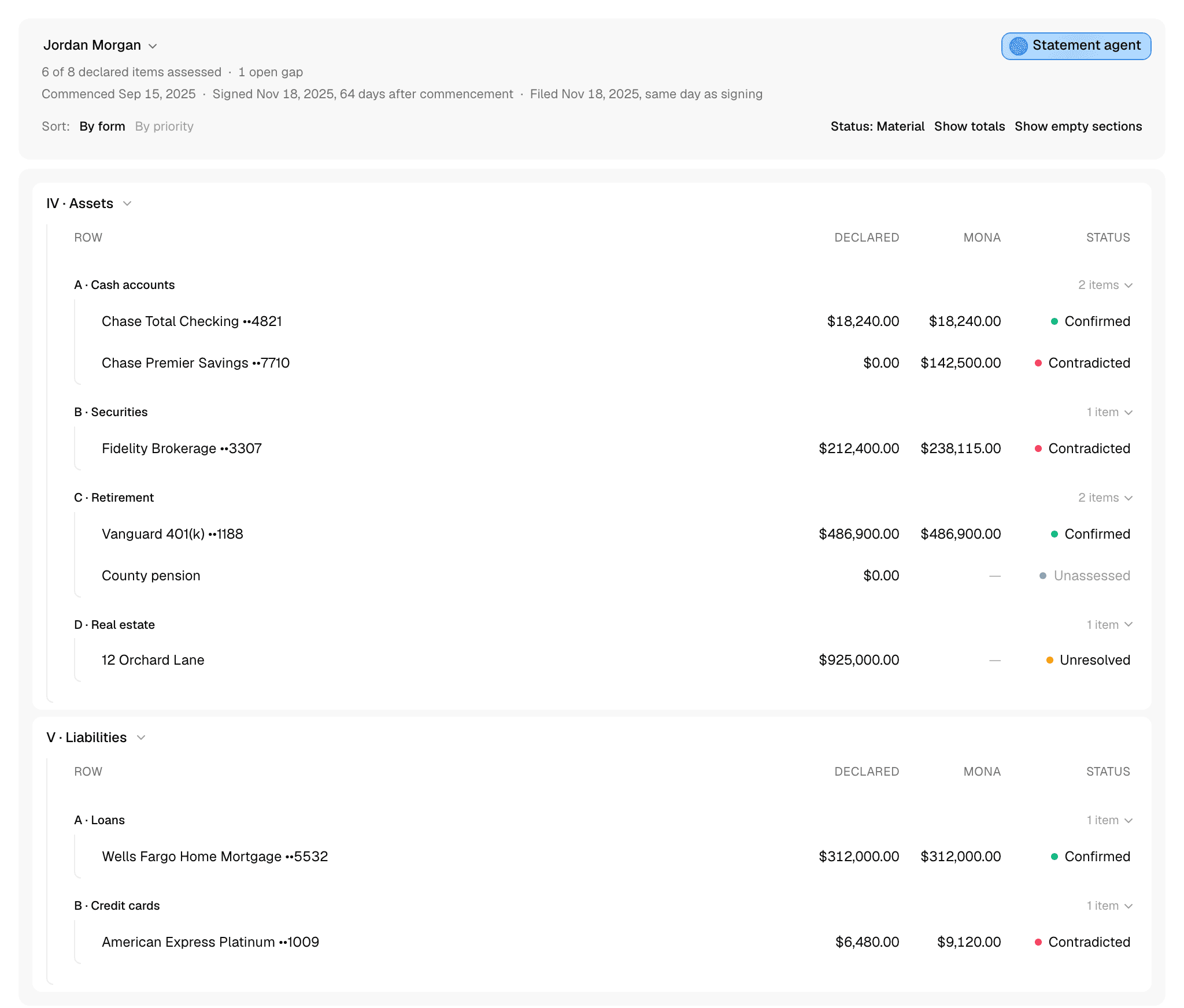
Net worth analysis checks each party's filed Statement of Net Worth against the evidence, line by line. Declared is what the statement says. Mona is what Trace found in the case's documents and transactions. Status says how the two compare.
The page opens once a filed statement finishes processing. Until then, it shows each filing's progress. To add a statement, see Statements.
How to work through a statement
- Check the lines that matter. Click a line and start Trace. It finds the value the evidence supports and compares it with what was filed.
- Read what Trace found. Click the line's status to see its reasoning and sources.
- Review the whole statement. Click Statement agent to check whether the statement adds up and what it left out.
- Get what's missing. Trace and the Statement agent each name what would settle an open question. Add it in Documents, then ask Trace to look again.
Reading the page
The header names the party whose statement you're viewing. Click the name to switch to the other party's statement.
Beneath the name:
- Progress: how many lines are assessed, how many gaps are open, how many lines have evidence to review because it conflicts, a source changed, or a field lacks support, and how many lines are proposed.
- Dates: commencement, when the statement was signed, and when it was filed, with the days between them.
Sections follow the form: expenses, income, assets, liabilities, and so on. Click a section's name to collapse it.
A line can hold several fields. A bank account has an institution, an account number, a title holder, and a balance, and each is checked on its own. The row shows the line's main field, usually the amount.
A column can show something other than a figure:
- — under Declared: nothing is filed for this line. Under Mona: Trace hasn't assessed it.
- pending under Declared: Mona is still matching the statement's entries to lines. If matching stops, the header shows Declaration association stopped. Click Retry.
- unreadable under Declared: Mona couldn't read the filed value.
- unknown under Mona: Trace looked, and the evidence doesn't establish a value.
- N/A under Mona: Trace found this doesn't apply.
- ≈ before an amount under Mona: an estimate. Hover over it to see the range.
What each status means
| Status | What it means |
|---|---|
| Confirmed | The evidence supports Mona's value, and it matches the statement. |
| Contradicted | The evidence supports Mona's value, and it differs from the statement. This includes a value filed for something Trace found doesn't apply. |
| Reconstructed | The statement left this out, and the evidence supports a value. |
| Estimate | No document establishes the value, so Mona estimated it. An estimate never confirms or contradicts the statement, and it stays out of totals. |
| Cannot verify | Something prevents a reliable comparison. |
| Unresolved | Trace reached an open question and has no value it can support yet. |
| Not applicable | Trace found this doesn't apply, and the statement gives no value. |
| Unassessed | Trace hasn't assessed this yet. |
| Mixed | The line's fields don't all share one status. |
| Proposed | The line isn't on the statement, and the Statement agent proposes adding it. |
| Not compared | Mona has no read filing to compare this line with. |
A line reads Cannot verify when:
- No evidence supports that field, or the evidence conflicts.
- A source changed or can no longer be found.
- The filed value is unreadable or still being matched.
- The evidence doesn't establish a value.
- The two values aren't for the same date.
- Trace can't tell whether two descriptions name the same thing.
To see which, click the status and read the field's reasoning and evidence.
Figures compare exactly, so a small difference still reads Contradicted. Trace compares text by meaning: "BOA" and "Bank of America, N.A." can name the same bank.
Each field needs its own evidence. A document that shows an account exists doesn't prove its balance.
Changing the view
- By form and By priority: By form follows the statement. By priority is one list, with the largest dollar difference first, in either direction, then lines with no dollar difference, worst status first.
- Status: click to cycle through three readings. Material, the default, shows the worst status among the fields Mona assesses by default. Field shows the status of the field in the row. Counts shows how many fields carry each status.
- Show totals: adds each section's totals.
- Show empty sections: adds the form's sections with no lines. An empty section isn't a verified zero.
- Hide proposed: hides proposed lines. It appears while the Statement agent has proposed lines open.
Long statements load in pages. By priority and the totals count only the lines loaded, so click Load more Financial Items until it's gone. Financial Item is the app's word for a line.
Dates
The form asks for assets and liabilities at more than one date, so those two sections have a date button. It opens on Statement Signed. Click it to switch to Case Commencement. Each section keeps its own choice. The form's current values are read at the date the statement was signed.
A comparison counts only when both values are for the same date. If they aren't, the status reads Date mismatch, or Date unknown or Date unavailable when a date can't be established, and no difference is shown. Hover over the amounts to see the dates. A dash can also mean the form doesn't ask for that value at that date.
Values the form dates on their own, such as a business's net worth, appear under their line as a separate valuation, outside the totals.
Totals
Click Show totals to add these to each section:
- Calculated total: the sum of the section's lines under Declared and under Mona.
- Printed total: the total printed on the filed statement. If it doesn't match the filed lines, the section says Printed total differs from filed rows and by how much.
The calculated totals count only known values. Estimates, unassessed lines, and proposed lines stay out, so the two totals aren't comparable until every line in the section is assessed.
Checking lines and reviewing the statement
Two agents do the checking on this page:
- Trace: click a line to start it, and click a line's status to read what it found.
- Statement agent: click Statement agent at the top of the page to review the whole statement. What it proposes adding appears in its section with a dashed border until you add or dismiss it.
Comparing filings
The table compares against the newest filing Mona has finished reading. While an amended statement is being read, the header says Amended statement processing, and the table stays on the last filing read.
When the amended statement is ready, Declared and the statuses move to it. Mona stays, because lines and Trace's work carry over, so a line confirmed against one filing can be contradicted by the next. If the amended statement was signed on a different date, Mona's signed-date values read Date mismatch until Trace reassesses them.
To see earlier filings, click a line's status and look under Declaration. Each filing is listed with its date and a link to the filed document, and changes from prior filing lists what changed on that line. The Statement agent also looks at what changed between filings.
What stays with you
- Whether a difference matters. Mona shows every difference and doesn't weigh them.
- What a difference means. Trace explains a cause where the evidence shows one. Whether it was an error, concealment, or dissipation is your call, and so is whether property is marital or separate.
- What joins the analysis. A proposed line waits for you, and a dismissed one stays out.