Cash flow
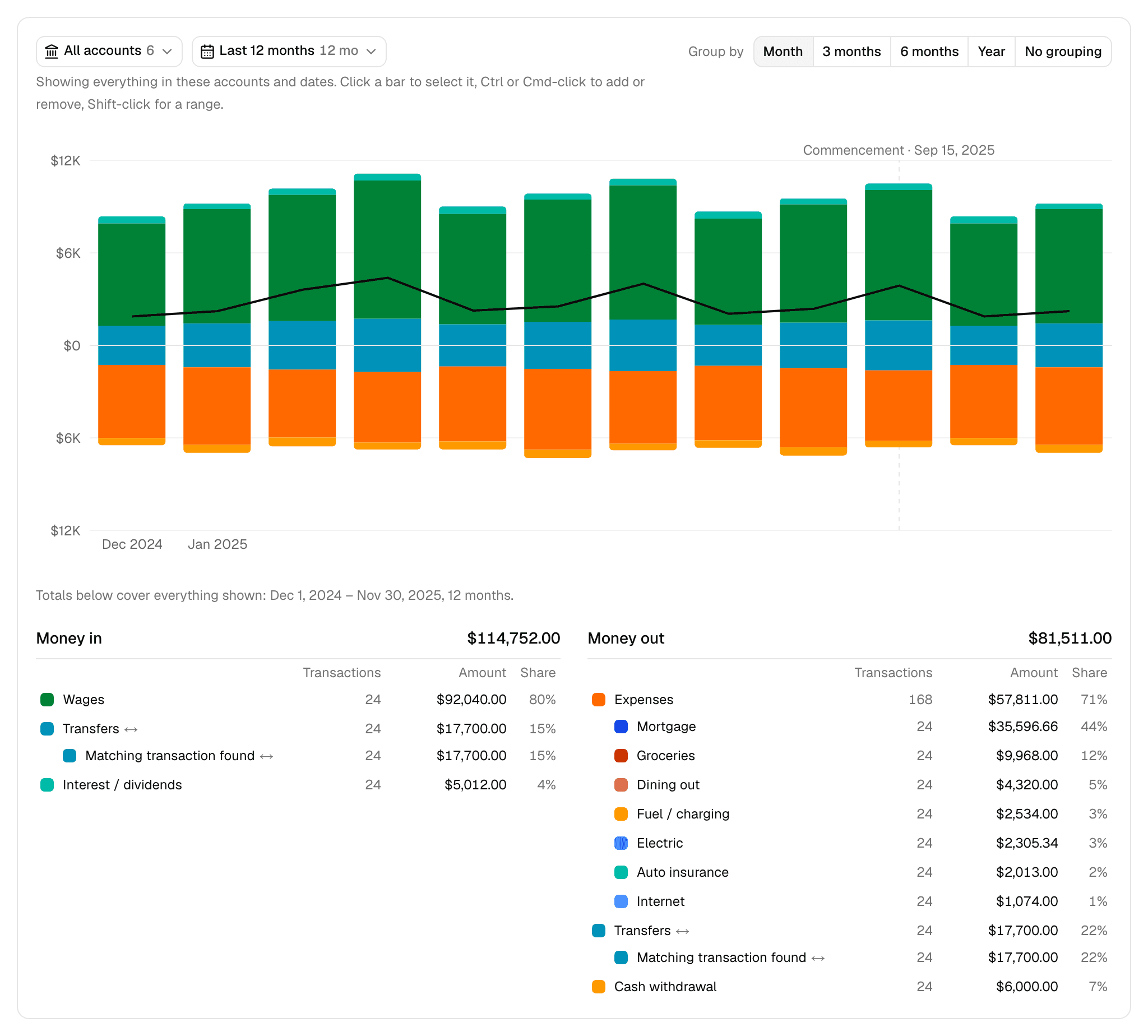
Cash flow shows the money in and money out of the case's accounts by period and by category, with transfers matched between accounts. Every figure opens the transactions behind it.
It covers checking, savings, money market, and credit card statements. Loan, retirement, and other accounts aren't included.
Choosing what to see
Two buttons at the top of the card set what the page reads:
- Accounts: all of them, or any set.
- Dates: all statements by default. You can also choose the last 12 months, the 12 months before commencement, a statement year, or any start and stop day.
Group by sets the bars: Month, 3 months, 6 months, Year, or No grouping.
Your accounts, dates, and selected months stay in the page's address, so a reload or a shared link keeps them.
Reading the chart
Money in stacks above the line and money out stacks below it, in the colors of the lists beneath. A black line traces the net, and a dashed line marks commencement. Hover over a bar for its figures.
To focus the lists on certain months, select their bars. The line under the chart names what the totals cover, and Clear returns to everything shown.
- Click a bar to select it.
- Ctrl or Cmd-click to add or remove one.
- Shift-click to select a range.
With No grouping, the chart shows one bar per row of the lists, with an optional Log scale so small rows stay visible. Clicking one of those bars opens its transactions.
Reading the net
The net is money in less money out for the period.
With all accounts selected, a matched transfer appears on both sides and cancels out, so the net shows money entering or leaving the household's accounts. Three things can make it read differently:
- A transfer that crosses periods. Money that leaves in March and arrives in April counts as money out in March and money in in April.
- A transfer with no match. It stays on one side until the case shows the other.
- A single account selected. The other side of each transfer is out of view, so the transfer counts as money in or out of that account.
Reading the lists
Money in and Money out each give a total and their rows, largest first, with the number of transactions, the amount, and its share of that side.
Rows come in three kinds:
- Categories: what the money was for, or where it came from. Mona assigns one to each transaction from its description, separately for each direction, so a description that's a payment one way and a receipt the other gets two.
- Expenses: on money out, one row over the spending categories, with each category net of its refunds.
- Transfers ↔: on both sides, split by how they matched.
Transfers split into:
- Matching transaction found: the other side is in a case account, so the money moved and wasn't spent.
- Matching transaction ambiguous: more than one transaction could be the other side.
- Card payment, not found: a card payment with no card in the case showing it arrive.
- Matching transaction not found: a transfer with no match in the case's accounts.
A transfer matches only on its whole amount, in the same currency, arriving from a day before to five days after it left. Split transfers don't match. You can't accept or reject a match yourself.
A merchant's refund isn't listed under money in, since it nets against Expenses. Balance transfers between cards aren't on either side.
The Money out total isn't the household's spending, and the Money in total isn't its income. Both include everything the statements show, transfers included. Read Expenses for spending. Mona lists deposits by source and doesn't group them as income.
Opening a row's transactions
Click any row to open its transactions. The popup starts from what you clicked, with its own Dates, Accounts, and Showing controls. Changing them here doesn't change the page.
- Buttons split the row one level down: Transfers by match, Expenses by category, and one category by merchant or else by account. The pie beside the chart by month draws the same split.
- Search and the In and out menu narrow the table beneath them.
- The table shows each transaction's date, merchant, description, category, account, amount, and statement.
When any row is a transfer, a Matching transaction column says what Mona found:
- Where the other side is: for example, "To Premier Savings, same day," with how many of its five checks fit. Hover over that to see each check.
- How many could be it: for example, "2 possible."
- None found, and why: digits that aren't in the case, an account with no statement for those dates, or an account the description names whose statements don't show the money.
A long list shows its newest transactions and tells you to choose fewer months to see the rest.
Transactions not categorized yet
Mona categorizes new transactions on its own after reading a statement. Until it finishes, a notice says how many are still being categorized and how much money they hold. These transactions aren't in any category yet, and View opens them.
Some transactions stay under categories like Deposit, source not shown or Payment, payee not shown. That means the statement doesn't say. Check the document, or ask your client.
Months with no statement
Some months have no statement lists the months in your dates where none of the selected accounts has a statement. Money in those months isn't in the totals.
The notice doesn't cover a month when just one account is missing, even though that month's figures are short by that account's activity. Use the Timeline to check each account.
What stays with you
- Categories are Mona's. You can't change a transaction's category or merchant, so check a figure against its transactions before you rely on it.
- The legal meaning is yours. Whether a deposit is income for support, whether a transfer was a gift or a loan, whether money is marital or separate, and whether spending was dissipation are your calls.
- Mona can read these figures too. Ask it about any period or category. Mona leaves out statements that still need review while this page includes them, so its figures can differ until they're resolved.