Missing accounts
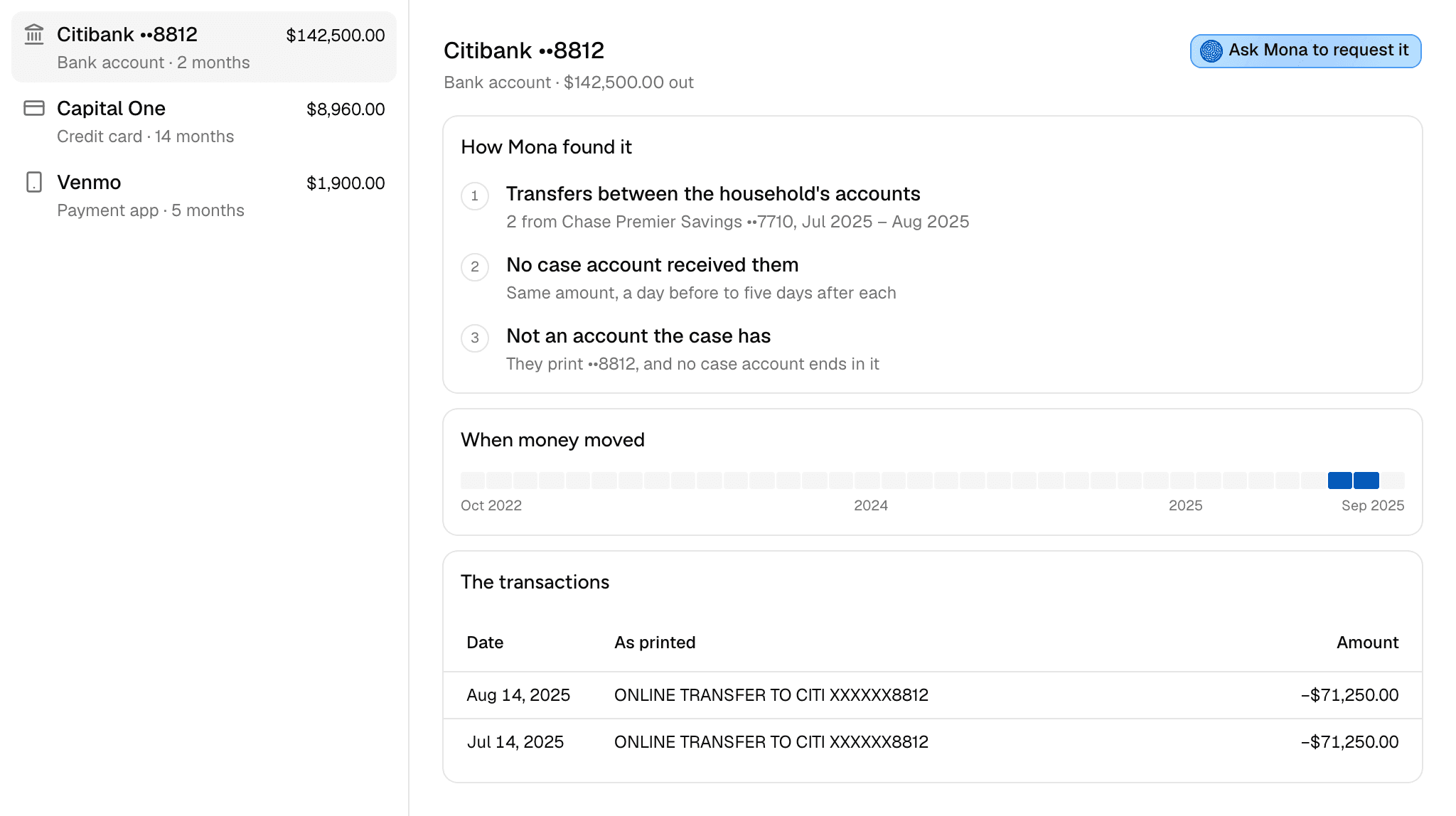
Missing accounts lists the accounts the case's money reached during the required window that the case has no statements for. Each one comes with the transactions that point to it and a way to ask Mona to draft its statement request.
How Mona finds them
Mona follows the money in the statements the case already has. It starts with transactions whose money goes to or comes from another account:
- Card payments
- Loan, mortgage, and lease payments
- Investment contributions and withdrawals
- Cash-outs from a payment app
- Transfers between the household's own accounts
- Money to or from the other party
For each one, Mona looks for the other side in the case's accounts: the same amount, within a day before to five days after the money left. A transaction with no match points to an account outside the case. Mona groups these by the last four digits they print, or by merchant when they print none.
Mona can't trace money into a loan or investment account. For those, it checks whether the case has an account of that kind at that institution.
What the list leaves out
An empty list doesn't mean every account has been found. Mona can only see accounts that money from the case's statements reached.
- Accounts no money reached. An account funded from elsewhere leaves no trace in the case's statements.
- Transactions that name no account. A transfer with no digits and no recognizable merchant stays on Cash flow as Matching transaction not found.
- Gaps in accounts the case has. If a case account has no statement for the days the money would have arrived, that's a gap on the Timeline.
- Money outside the required window. The window is set in Case settings.
Brokerage and crypto statements don't create accounts in Mona, so a brokerage account can appear here even when its statement is already in Documents. Check Documents before you request one.
Reading the list
Accounts are listed largest first. Each row shows the account's name, the amount that moved, its kind, and the number of months money moved. The kinds are Bank account, Credit card, Investment, Loan or lease, Payment app, and The other party's.
Select an account to see:
- How Mona found it: three steps, covering what the money was, why no case account shows the other side, and why it isn't an account the case has.
- When money moved: a strip with a cell for each month of the required window, filled where money moved.
- The transactions: each one's date, its description as printed, the case account it moved through, and the amount.
What to do with one
- Decide if it matters. A listed account is a lead that Mona hasn't confirmed. Read the transactions and decide whether it's worth pursuing.
- Check it isn't already on file. A statement could be in Documents under another name, or be one Mona doesn't turn into an account.
- Click Ask Mona to request it. This opens a new chat with a draft naming the account, its transactions, the total, and the required window. Edit it if you want, then send it.
- Review what Mona writes. You decide whether and how it goes out, since Mona doesn't send anything out of the firm.
- Upload the statements when they arrive. Once Mona reads them, the account moves to Accounts and off this list.
You can't dismiss an account from the list. Mona works it out again from the case's statements each time, so it stays until statements explain the money.