Accounts
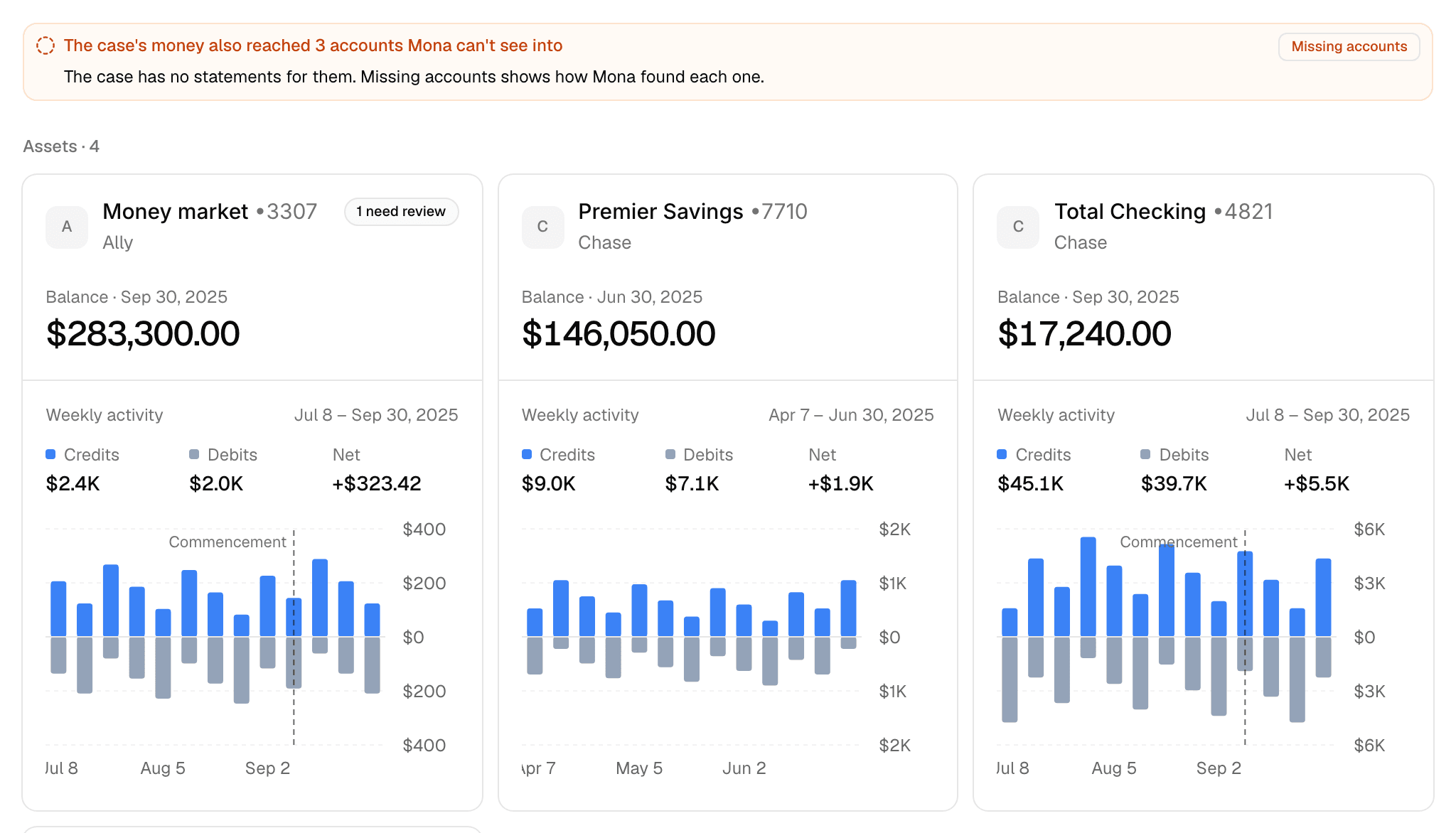
Accounts shows every financial account Mona found in the case's statements, each as a card. A card opens a page with that account's balance history, transactions, and statements.
How Mona identifies accounts
When you upload a statement to Documents, Mona reads each account printed in it. A combined statement holding three accounts gives you three cards. Twelve monthly statements for one account give you one card.
Mona does this for:
- Bank accounts: checking, savings, and money market
- Credit cards
- Loans: mortgages, home equity lines, personal loans, promissory notes, and student loans
- Other accounts with a balance: retirement, custodial, and trust accounts, and cash value life insurance
Brokerage and crypto statements report holdings, so they stay in Documents and don't appear on this page. The same goes for documents that aren't account statements, such as tax returns and pay stubs.
If Mona can't tell which account a statement belongs to, it holds the statement and asks you under Needs review in Documents.
Reading a card
Assets come first, then liabilities, and each group is in name order.
- Name and institution: the account's name, its last four digits, and its bank or issuer.
- Need review: how many of its statements still need you. See Statements that need review.
- Balance: the latest balance its statements print, with that date.
- Weekly activity: its credits, debits, and net over the 13 weeks ending at its latest statement. The weeks follow each account, so a closed account shows its last 13 weeks before closing, and two cards can cover different dates.
- Bars: one per week, with credits above the axis and debits below. Shaded weeks have no statement. A marker shows the week the case commenced, when that week is in view.
Mona reads every account the way its statement prints it. A debit is money spent or charged. A credit is money received or paid in. On a credit card, a purchase is a debit, a payment is a credit, and the balance is what's owed.
When the case's money reached accounts it has no statements for, an alert above the cards counts them and links to Missing accounts.
An account's page
Click a card to open the account. The header gives its name, institution, and holders. Ask Mona about this account opens a new chat with the account already named, for you to finish and send.
Summary
- Latest balance: with a line tracing the closing balance of each statement. The line breaks where statements are missing.
- Credits, Debits, Net, and Transactions: totals across every statement, with the span they cover named above them.
- Activity: credits and debits by week, three months by default.
- By month: credits above the axis and debits below. Choose a month to open its transactions.
- Largest transactions: the largest on either side.
Transactions
The tab lists every transaction on the account, with its date, merchant, description, category, type, amount, and statement. Mona assigns the merchant and category from the description, which stays as printed.
You can narrow the table by:
- Dates: a preset or any start and stop day.
- Showing: a place in the Cash flow lists, such as Money out › Expenses. Buttons below it split what's shown one level further.
- Search: by description, merchant, category, or amount.
- Credits or debits, and type.
A line of totals above the table follows your filters. Ask Mona about these transactions opens a new chat with the account and your filters already named.
Transfers also show a Matching transaction column. Cash flow explains how to read it.
Statements
The tab lists every statement newest first, with each missing range in its place by date, so one statement's opening balance sits under the previous one's closing balance. Each row shows the period, file, opening and closing balances, credits, debits, and status.
Measure missing statements against sets which ranges count as missing:
- Required window: the years set in Case settings. This is the default.
- All evidence: from the account's first statement to its last.
Searching by file name or period leaves the missing ranges out.
Statements that need review
Click a statement anywhere it appears to open it beside the page. You get its opening and closing balances, its transactions, and a link to the document.
Mona checks that each statement's opening balance and transactions reach its printed closing balance. When they don't, the statement is marked Needs review and says by how much. Review reading opens the review, where you can accept the reading with an exception, correct it, or ask Mona to correct it. This is the same review as Needs review in Documents.
A statement you accept is marked Accepted exception. A statement that hasn't been checked yet offers Run verification instead.
What the totals count
- Posted transactions in the account's main currency. Pending and reversed transactions, and those in another currency, are listed but not counted. The page says how many.
- Statements that need review. Leaving them out would hide a month of activity, so they count, and their rows are marked.
- Only what statements cover. A day or month with no statement is empty, which is different from zero.
A Read these totals with care notice appears when two statements cover the same dates, which may count transactions twice, or when some transactions couldn't be read, which may leave totals short.
What stays with you
Accounts reports what the statements print. Whether an account is marital or separate, and what a transaction means for the case, is your call. To test a declared figure against this evidence, use the Net worth analysis.