Timeline
The Timeline puts every account's statements on one calendar, so you can see which periods the case has and which it's missing.
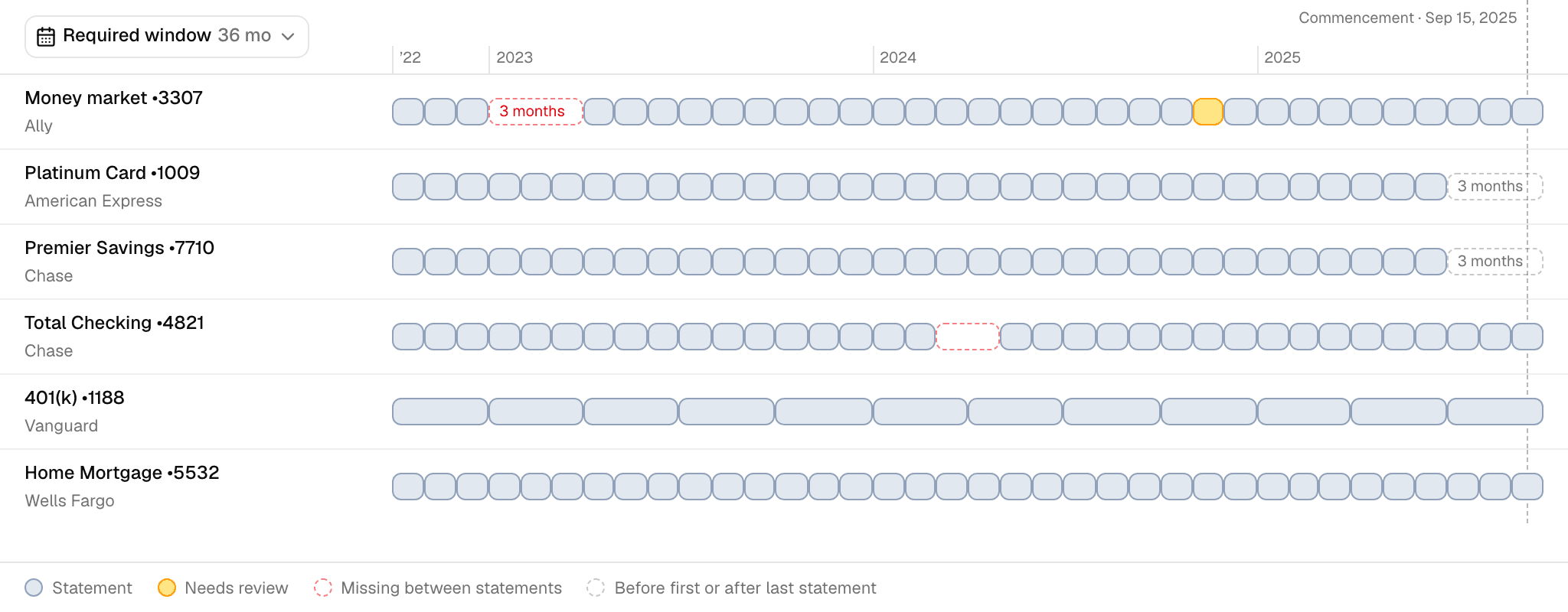
Reading the calendar
Each row is an account, in the same order as Accounts. Each block is one statement, drawn across the dates it covers. The key at the bottom names the four kinds of block:
- Statement (slate): Mona read it and its balances check out.
- Needs review (amber): its balances haven't checked out. A statement you accepted with an exception also stays amber, and hovering over it says so.
- Missing between statements (red dashes): the account has statements on both sides of this range.
- Before first or after last statement (gray dashes): no statement covers this range, and it falls outside the account's statements.
A dashed vertical line marks commencement. Statements that overlap by more than a day stack on a second line, which can mean a duplicate or a corrected statement.
From the calendar you can:
- Hover over a statement to see its file name, which opens it in Documents, and its dates.
- Click a statement to open it beside the page, with its balances and transactions.
- Click a missing range to see its exact dates.
- Click an account's name to open its page.
Choosing the dates
The dates button above the accounts sets what the calendar shows. It opens on the required window. You can also choose:
- Last 12 months
- All statements
- 12 months before commencement
- A statement year
- Any start and stop day
The required window is the period the case needs statements for. It runs back from the month of commencement by the number of years set under Coverage Window in Case settings, and it ends at commencement. With no commencement date, it runs back from the latest statement month.
Reading the gaps
The two kinds of dashed range call for different next steps:
- Red: the account was open on both sides, so a statement should exist. These are usually the first to ask for.
- Gray: the range may fall before the account opened or after it closed. Check the first or last statement before asking.
The Timeline only has rows for accounts with at least one statement in the case. Accounts with none are on Missing accounts.
Turning gaps into requests
Click Ask Mona and ask for what you need:
Draft a discovery demand for the statements we're missing.
Mona writes the demand in Work product. Each item names the institution, the account by its last four digits, the date range, and the document type, using the narrowest range that closes the gap. Mona also flags any gap it thinks is too weak to ask for.
A discovery demand goes to the other party. For gaps in your own client's accounts, ask your client.
You edit and serve the demand, since Mona doesn't send anything out of the firm. When the statements arrive, upload them to Documents. Once Mona reads them, the blocks fill in.