Statements
Statements shows each party's statements of net worth as a series of filings, and where each filing stands. To see what a filing says against the evidence, open Net worth analysis.
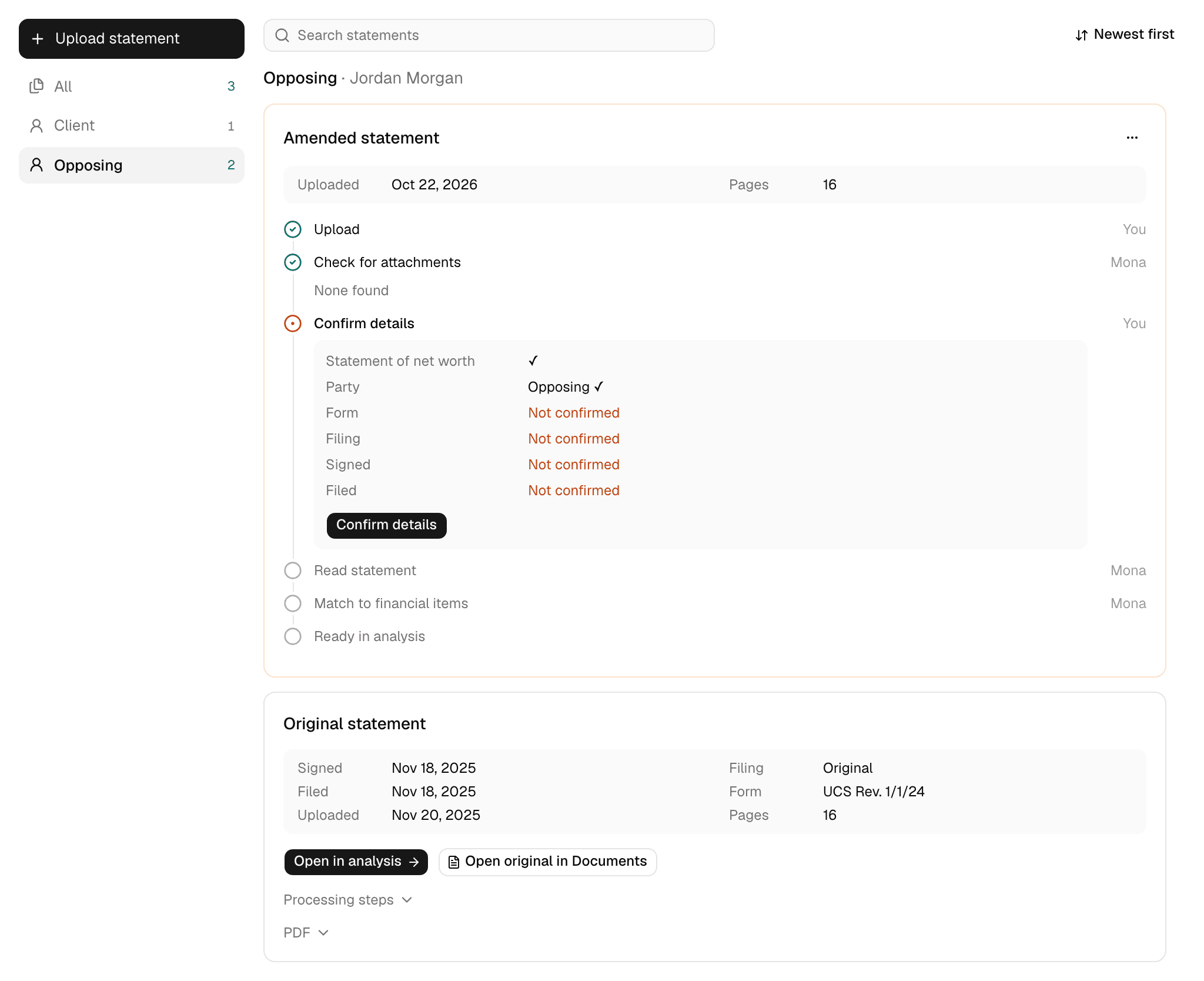
Each card is one statement, titled Original statement or Amended statement. The views beside the cards show All, Client, or Opposing, plus Needs a party while a statement waits for you to confirm its party. You can search by party, date, form, or attachment name, and order the cards oldest or newest first.
Upload a statement
Click Upload statement and choose whose it is. Files must be PDFs of up to 50 MB. Each party's option says what the upload would be: First statement, Adds an amendment, or Waiting on the earlier statement.
A statement uploaded in Documents also appears here, since Mona recognizes it from its contents. In Documents, it shows under Needs review as Statement to confirm.
The steps
Each card lists six steps, with an icon for where each one stands and a label for who acts.
| Step | Who | What happens |
|---|---|---|
| Upload | You | The file is in the case. |
| Check for attachments | Mona, then you if it finds any | Mona checks whether the PDF holds more than the statement. |
| Confirm details | You | You confirm what the document is, whose it is, and which form it's on. Mona doesn't start reading before this. |
| Read statement | Mona | Mona reads the form line by line. |
| Match to financial items | Mona | Mona connects each line to the financial item it describes, either one already in the party's filings or a new one. |
| Ready in analysis | None | The filing is ready to open in Net worth analysis. |
Check for attachments
A filed statement often arrives stapled to tax returns, W-2s, or a retainer. Mona proposes splitting them off, and what the card shows depends on what it finds:
- This upload holds the statement and some attachments: click Review split to open the Review Room.
- Mona isn't sure this is one document, or what it is: click Review.
- No statement of net worth found: Mona says what it read the file as. Click It's a statement if Mona got it wrong, or Delete upload if it did not.
Attachments move to Documents as documents of their own, and Mona reads them without waiting for Confirm details. An addendum stays with the statement.
Confirm details
Click Confirm details to open the statement beside these questions:
- Document: Statement of net worth, or Something else.
- Party: Client or Opposing. An upload from Upload statement already has this filled in.
- Form revision: Mona selects the one it detected and names the footer text to check it against.
- Filing: Original or Amendment.
- Signed or sworn, from the signature or verification page, and Filed with the court: enter each date, or mark it unknown.
Start reading becomes available once every question is answered, and the dialog lists what's left until then. If the document isn't a statement, choose Something else, pick what it is, and click Set type. Mona reads it as that type, and it leaves this page.
When a step stops
| What the card says | What you do |
|---|---|
| Couldn't process this file. | Click Delete upload and upload it again, or use Retry processing in Documents. |
| Reading couldn't start. | Read the reason on the card, then use Retry processing in Documents. |
| Reading stopped before it finished. | Click Retry. |
| Matching stopped twice. Nothing was changed. | Click Retry. |
Amended statements
To add an amended statement, click Upload statement and pick the party. It gets its own card, and the original stays as it was. Two rules apply:
- One at a time for each party: Mona won't start a party's next statement until it has finished the earlier one.
- The same form revision: a party's filings must be on the same revision for Mona to compare them. Confirm details tells you if the one you chose differs.
To compare a party's filings, open Net worth analysis.
A finished statement
Once every step is done, the card shows the statement's details and two ways in: Open in analysis and Open original in Documents. Attachments, Processing steps, and PDF each open when you click them.
Delete an upload
Before reading starts, the three-dot menu on a card has Delete upload. It deletes the uploaded file, the statement split from it, and any attachments split off, and it can't be undone. Once reading has started, the statement stays with the case.
What stays with you
- Starting the reading: Mona reads a statement only after you confirm its details.
- Judging the statement: the Statements page shows that a statement was read. It doesn't check the statement against the evidence. For that, send Trace or the Statement agent from Net worth analysis, and review what they find.